
Brighten Your New Tab with 500px
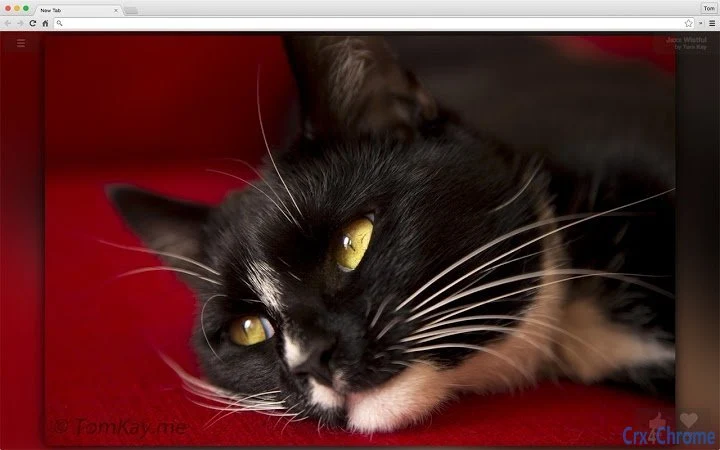
The Custom Google Background team introduces a fresh, visually driven tool designed to transform your browsing experience. This desktop application enhances the New Tab page by integrating directly with your 500px account, offering a dynamic gallery of high-quality images with every new tab session. It’s ideal for users seeking creative inspiration, visual personalization, or a more engaging start to their digital workflow.
The software targets professionals in design, photography, and content creation, as well as everyday users who appreciate aesthetic digital environments. By curating images from a trusted photo platform, it helps reduce visual fatigue and supports productivity through daily visual refreshment. Real-world usage includes using the app during work breaks, setting a mood for creative projects, or simply enjoying curated art while switching between tasks.
The developer did not provide additional details about the app’s background processes or data handling beyond OAuth integration.
Key Features & Capabilities
- 500px Integration: Connects securely to your 500px account via OAuth to pull images directly from the platform’s curated library.
- Dynamic Image Rotation: Automatically displays a new image from your selected categories each time a new tab is opened.
- Custom Categories: Choose specific image categories (e.g., nature, architecture, portraits) to tailor the visual experience to personal or professional needs.
- Direct Image Interaction: Like and favorite images directly from the New Tab interface, with actions synced to your 500px account.
- Seamless User Experience: Designed to work without disrupting existing browser workflows or requiring complex setup.
User Interface, Workflow & Performance
The user interface is minimal and focused, designed to blend seamlessly into the browser’s New Tab page. Navigation is intuitive, with no additional menus or settings required beyond initial account linking. The workflow begins with a simple login through 500px, followed by category selection, after which the app operates automatically. Users can expect a fast load time, as the application size is 3.5 MB and is optimized for quick startup. The developer did not specify resource usage details, but based on general software behavior patterns, it is expected to consume minimal CPU and RAM during idle periods. Stability appears consistent, as the app runs as a browser extension with no reported crashes in the provided data. Performance observations are based on general software behavior patterns. No external tools were used to measure actual load times or memory consumption.Compatibility & System Requirements
The software is compatible with Windows and Mac operating systems. It operates as a browser extension, meaning it integrates directly with major desktop browsers that support extension frameworks. The installation size is 3.5 MB, which is compact and suitable for most modern devices. Exact system requirements were not listed. The developer did not provide information about minimum processor speed, RAM, or storage needs. Compatibility information was partially provided. Users should ensure their browser is up to date to maintain full functionality. The app does not appear to require administrative privileges for installation.Pros and Cons
Pros
- Seamless integration with 500px for high-quality, curated images
- Automatically updates the New Tab with fresh visuals daily
- Secure OAuth login protects user account data
- Simple, distraction-free interface enhances usability
- Free to use with no hidden costs
Cons
- Requires a 500px account to access full functionality
- Dependent on browser extension support; may not work with all browsers
- Exact performance impact on system resources was not specified
- No offline image access or caching features were mentioned
FAQ Section
Is this software compatible with all browsers?
The software is designed to work with browsers that support extensions, but compatibility may vary. Users should check their browser’s extension requirements.
Is my 500px account data safe?
Yes, the app uses OAuth for secure authentication. Your 500px login credentials are never stored or transmitted through the app.
Can I use this offline?
The software requires an active internet connection to fetch new images from 500px. Offline usage is not supported based on current information.
How often are new images displayed?
A new image is shown each time a new tab is opened, drawing from your selected categories in the 500px library.
Is this tool free to download and use?
Yes, the software is available at no cost. There are no subscription fees or in-app purchases.







